Harper: The Bold Display Font That Commands Attention
Every designer knows the feeling—you're staring at a blank canvas, trying to find that one typeface that will make everything click. Something bold enough to stop someone mid-scroll, versatile enough to work across a dozen different applications, and distinctive enough to actually be remembered. That's exactly where Harper enters the conversation. This cool, versatile, and thick lettered display font has a presence that's hard to ignore, and once you start working with it, you'll quickly understand why so many creatives are reaching for it when they need designs to pack a real punch.
What Makes Harper Stand Out in a Crowded Font Library
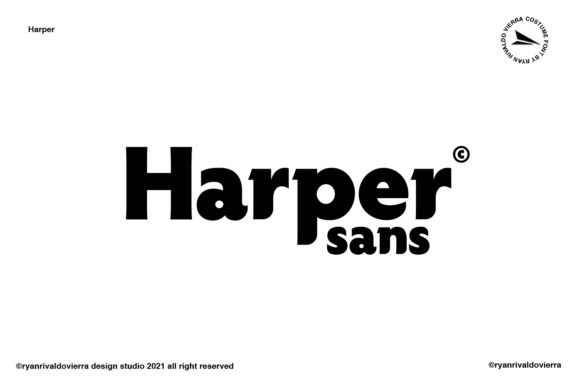
Let's talk about visual weight. Harper isn't a wallflower—it's the typeface that walks into the room and owns it. The thick letterforms give every word an immediate sense of authority and confidence, which is exactly what you want when designing posters, flyers, or any print material meant to grab eyeballs from a distance. But here's what separates Harper from other heavy display fonts: it doesn't sacrifice personality for boldness. The letter shapes have a modern, clean aesthetic that feels contemporary without being trendy in a way that'll look dated next year.
The versatility factor is worth emphasizing because it's genuinely rare. Some thick display fonts lock you into one specific mood—maybe retro, maybe grunge, maybe ultra-modern. Harper manages to feel adaptable. You could use it for a music festival poster on Monday and a boutique bakery's packaging on Tuesday, and it would feel perfectly at home in both contexts. That flexibility comes from the careful balance between its geometric structure and subtle design details that give it character without limiting its range.
Where Harper Really Shines: Real-World Applications
Think about the projects where typography needs to do heavy lifting. Branding is an obvious starting point. If you're building a brand identity from scratch or refreshing an existing one, Harper gives you a primary typeface that immediately communicates strength and modernity. It works beautifully as the hero font in a logo design, especially when paired with a cleaner sans serif or elegant serif font for body copy. The contrast between Harper's boldness and a lighter companion font creates visual hierarchy that guides the viewer's eye exactly where you want it.
Packaging design is another area where this font earns its keep. On a crowded shelf, products have maybe two seconds to make an impression. Harper's thick, commanding letterforms ensure your product name doesn't get lost in the noise. Whether you're designing labels for artisanal hot sauce, cosmetic packaging, or a subscription box, the font brings that premium feel that suggests quality before someone even picks up the product.
Social media graphics deserve special mention here. We're all competing for attention in an endless feed, and Harper's boldness translates exceptionally well to digital screens. It's perfect for Instagram quote graphics, announcement posts, sale promotions, and story templates. The thick strokes remain crisp and readable even at smaller sizes on mobile devices, which is a genuine practical advantage over some display fonts that fall apart when scaled down.
For anyone working on merchandise—think t-shirts, tote bags, mugs, stickers—Harper's strong silhouette makes it ideal. The letterforms have enough presence to look fantastic on physical products without needing additional design elements to prop them up. Sometimes a single word rendered in Harper is all a design needs to work.
Pairing Harper With Other Typefaces
One of the most practical skills in typography is knowing how to combine fonts, and Harper plays well with others if you follow some basic principles. The golden rule with any bold display font is contrast. Since Harper brings so much visual weight, your secondary font should be lighter and more understated.
A clean sans serif font works beautifully for body text alongside Harper headlines. Think something like a geometric sans with open letterforms—this creates breathing room and lets Harper's personality take center stage without the overall design feeling heavy or overwhelming. For projects that need a touch of elegance, pairing Harper with a refined script font for accent text can create a sophisticated contrast that feels intentional and polished.
Here's a practical tip: always test your font pairings in context. Don't just place two typefaces side by side in a blank document. Put them into your actual layout—a mockup of your business card, a draft of your website header, a rough version of your packaging. Typography that looks promising in isolation sometimes reveals issues once it's part of a real composition. With Harper specifically, pay attention to how its letter spacing interacts with your body font's spacing. You may need to adjust tracking slightly to create a harmonious rhythm between the two.
Readability Considerations for Different Mediums
Let's address something important because it matters for every project: readability. Harper is a display font, which means it's designed primarily for headlines, titles, and short bursts of text rather than extended paragraphs. Using it for a 200-word product description would be a mistake—not because it's a bad font, but because thick display typefaces tire the eye when used at length.
Where Harper absolutely excels is in high-impact, short-form applications. A five-word headline on a poster? Perfect. A logo with one to three words? Ideal. A call-to-action button on a website? Excellent. A product name on packaging? Exactly right. Understanding this distinction between display and body typography is one of those fundamentals that separates amateur-looking designs from professional ones.
For print materials like posters and flyers, Harper's thick strokes ensure legibility from a distance, which is precisely what display typography should accomplish. On digital platforms, the font remains sharp and clear across different screen resolutions. Just remember to consider your color choices—thick fonts like Harper can feel visually dominant, so give them enough white space and consider how they interact with background colors and textures.
Choosing the Right Style for Your Project
Before committing to any font for a project, take time to review all the included styles and variations. Different weights, alternates, or stylistic options can dramatically change the font's mood and suitability. A slightly condensed version might work better for a vertical layout, while a wider style could be perfect for a horizontal banner. This kind of exploration is where you discover the "endless possibilities" that make a versatile typeface truly valuable in your toolkit.
Also think about the emotional tone your project needs. Harper's boldness communicates confidence, energy, and modernity. That's perfect for fitness brands, tech startups, event promotions, food and beverage packaging, and creative agencies. It might require more careful consideration for luxury brands that lean toward understated elegance or formal institutions that prefer traditional serif typography. Matching your font choice to your project's emotional goals is just as important as matching it to your visual preferences.
Licensing and Commercial Use
One practical consideration that often gets overlooked until the last minute: commercial licensing. If you're using Harper for client work, merchandise you plan to sell, or any commercial application, make sure you understand the licensing terms. Most premium fonts come with clear licensing agreements that specify what's covered—desktop use, web use, embedding in digital products, and so on. Reviewing these details upfront saves headaches later and ensures your projects are fully compliant. It's a small step that protects both you and your clients.
Harper offers that sweet spot of being a creative font with enough versatility to justify its place in your permanent design assets collection. Whether you're a freelance designer juggling diverse client needs, a small business owner creating your own marketing materials, or a content creator building a recognizable visual brand, having a reliable, bold display font at your fingertips makes every project a little easier and a lot more visually compelling. The next time you're hunting for that perfect typeface to anchor a design, give Harper a serious look—your posters, logos, and social posts will thank you for it.