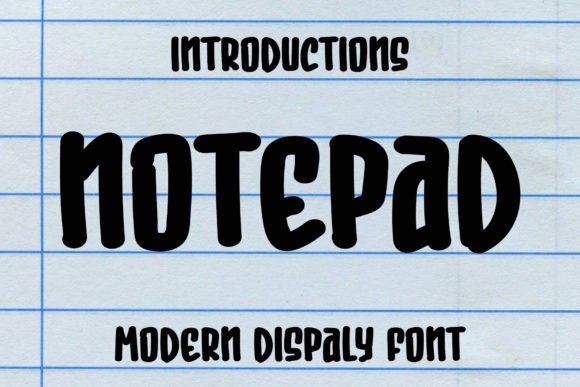
Notepad: The Playful Display Font for Cheerful Designs
Ever find yourself scrolling through endless font libraries, searching for that perfect typeface that just feels... happy? You know the one—it needs to bring a sense of joy and approachability without looking childish or unprofessional. For designers, marketers, and small business owners working on projects aimed at families, children, or simply cheerful topics, this search can be surprisingly specific. You need something that communicates warmth and fun while still being clear and functional. That's where a well-crafted display font like Notepad can become a secret weapon in your design toolkit.
Understanding the Visual Personality of Notepad
Notepad is a display typeface designed with personality at its core. Its rounded letterforms, slightly irregular baselines, and playful proportions give it an inherently friendly and approachable character. Think of it as the typographic equivalent of a bright, sunny day—it immediately puts the viewer at ease. This isn't a font for legal documents or dense body text; its strength lies in headlines, logos, and short bursts of impactful text where its quirky charm can shine. The visual appeal comes from its ability to feel handcrafted and personal, yet consistent enough for professional applications. It strikes a balance between whimsy and readability that many designers find invaluable for certain projects.
One of the most practical features of Notepad is its PUA (Private Use Areas) encoding. For those unfamiliar, this means the font includes a comprehensive set of alternate characters, ligatures, and stylistic swashes that are easily accessible through standard design software. You don't need to be a typography expert to use them. This allows for significant customization—you can adjust a headline to have a more flourished feel or a simpler, cleaner look depending on the context. This versatility is a huge asset, effectively giving you multiple font variations within a single typeface family, which can streamline your workflow and expand your creative options.
Where This Font Truly Shines: Practical Applications
So, where does a font like Notepad fit into your real-world projects? Its cheerful demeanor makes it exceptionally versatile for specific niches and applications. Let's break down some of the most effective uses.
- Branding & Logo Design: For businesses targeting families, children's products, education, pet care, or lifestyle brands with a friendly ethos, Notepad can form the cornerstone of a memorable logo. Its distinctive personality helps with instant brand recognition. Imagine a boutique bakery's logo, a children's clothing tag, or the masthead of a parenting blog—this font communicates the right vibe immediately.
- Packaging & Merchandise: On shelf or online, packaging needs to catch the eye quickly. Notepad works beautifully for product names on packaging for toys, snacks, craft supplies, or artisanal goods. Its playful nature makes it perfect for merchandise like t-shirts, tote bags, stickers, and mugs where the text itself is part of the fun design.
- Digital & Print Marketing: Social media graphics are a prime territory. Use it for Instagram story headlines, YouTube thumbnails, Facebook event banners, or Pinterest pins to grab attention in a crowded feed. For print, it's excellent for flyers, posters for local events, workshop announcements, or sale banners where you need to convey excitement and approachability.
- Editorial & Web Design: In editorial layouts for magazines or blogs focused on crafts, recipes, or family activities, Notepad can be used for pull quotes, section headers, or article titles to add visual interest and break up monotony. On websites, it can style specific elements like call-to-action buttons, featured post titles, or promotional pop-ups to draw the user's eye.
- Invitations & Digital Products: Its handwritten feel is ideal for party invitations, greeting cards, and announcements. Furthermore, if you create and sell digital products—like planners, educational worksheets, or printable wall art—incorporating Notepad can make your offerings feel more cohesive and professionally designed.
Making It Work: Pairing and Readability Tips
Using a display font effectively is all about context and contrast. Notepad is a star player, but it needs the right supporting cast. A fundamental rule in typography is to pair a strong display font with a more neutral, highly readable font for body text. This creates visual hierarchy and ensures your message is clear.
Try pairing Notepad with a clean, simple sans serif font like Open Sans, Lato, or Montserrat for paragraphs and smaller text. The contrast between the playful display font and the modern, minimalist sans serif will make both look better. Alternatively, for a slightly more traditional but still clean look, a classic serif font like Georgia or Lora can work. The key is to avoid pairing it with another highly stylized font, like a script font or another quirky handwritten font, as this will create visual clutter and reduce readability.
Always test your font pairings in context. Mock up a business card, a social media post, and a website header to see how they interact at different sizes. Pay close attention to readability, especially for longer text or at smaller scales. While Notepad is clear for its category, ensuring sufficient contrast between text and background color is crucial—bright colors are part of its charm, but they must not compromise legibility.
Integrating Notepad into Your Design Assets
Before you commit, it's wise to explore the full range of what the font offers. A quality premium font like this will typically include multiple styles. Check if it comes with bold, italic, or outline versions. These variations can dramatically extend its utility, allowing you to create emphasis and hierarchy within your designs without switching fonts. For instance, using the regular weight for a main headline and the bold weight for a subheading can create a cohesive look.
Another critical, though often overlooked, aspect is licensing. If you're using Notepad for a client project, a commercial product you're selling (like a t-shirt design), or any work that generates revenue, you must ensure you have the correct commercial font license. Review the license agreement that comes with the font purchase. Most reputable font licenses cover a wide range of uses, but it's your responsibility to confirm it covers your specific project, especially for large-scale distribution or merchandise. This due diligence protects both you and your client.
Ultimately, incorporating a typeface like Notepad into your library is about adding a specific tool for a specific job. It’s not a one-size-fits-all solution, but for projects that demand a dose of cheerfulness, approachability, and playful energy, it can be the element that ties your entire brand identity together. By using it strategically—in headlines, logos, and key graphic elements—you can create designs that resonate emotionally with your audience, improve visual consistency across your materials, and make your brand or project instantly recognizable and engaging. The best design choices are those that serve the project's goal and speak directly to its intended audience, and for many cheerful themes, Notepad speaks their language perfectly.